
Most people do not file their own Medicare claims. Doctors, suppliers, and pharmacies usually submit the claim, depending on your coverage. If you do need to file, your coverage determines the form, destination, and status route. Form CMS-1490S applies only to limited Original Medicare cases.
Claim paperwork can feel confusing. You may receive an unexpected bill or be unable to find a claim. This guide will help you choose the right path. It explains how to file when needed, check status, read a notice, correct an error, or recognize when you may need a separate appeal.
Start by identifying which type of Medicare coverage applies to the claim.
On this page
- Do you usually need to file a Medicare claim yourself?
- Which Medicare claims process applies to your coverage?
- How to file a Medicare claim with Form CMS-1490S
- Where do you send a Medicare claim?
- How do you check Medicare claim status?
- How do you read a Medicare Summary Notice or EOB?
- How do you correct Medicare claim or billing information?
- When does a Medicare claim problem become an appeal?
- Medicare claims checklist
Do You Usually Need to File a Medicare Claim Yourself?
Usually, no. Medicare says people should need to file their own claims only in rare cases. With Original Medicare, the law requires doctors, providers, and suppliers to file claims for covered services and supplies. Pharmacies and in-network providers usually send claims to your private Medicare plan.
If an Original Medicare claim is missing, first ask the doctor, provider, or supplier whether it was submitted. Medicare says you may need to file if a provider cannot file, refuses to file, or is not enrolled in Medicare. Filing the claim does not guarantee payment.
A provider who is not enrolled is not necessarily the same as one who has opted out of Medicare. If an opted-out provider entered into a private contract with you, Medicare generally will not pay for the services. This can be true even when Medicare would otherwise cover them. Medicare identifies an exception for emergencies. Review the contract and Medicare's provider guidance before trying to file the claim.
If you have Medicare Advantage or Part D, do not assume the Original Medicare form applies. Follow your plan's reimbursement or claim-submission instructions.
Medicare claims generally must be filed within 12 months—one full calendar year—after the service date unless an exception applies. If a provider has not filed and the deadline is approaching, contact Medicare promptly to confirm what applies to that service. See Medicare's claim-filing guidance for the current rules.
Which Medicare Claims Process Applies to Your Coverage?
Original Medicare claims go through Medicare, while Medicare Advantage and Part D claims generally go through the private plan. That difference controls who normally submits the claim, where you check it, and which notice you receive.
| Coverage | Who usually submits the claim? | Where do you check it? | What should you remember? |
|---|---|---|---|
| Original Medicare | The provider or supplier submits covered-service claims to Medicare | Secure Medicare account and Medicare Summary Notice | You'll rarely need to file CMS-1490S yourself |
| Medicare Advantage plans | An in-network provider, supplier, or pharmacy usually submits to the plan | Plan claim information, EOB, website, or member services | Follow the plan's process; formats and timing can vary |
| Stand-alone Part D | The pharmacy usually submits to the drug plan | Part D EOB, online plan information, or member services | The EOB covers prescription claims and costs |
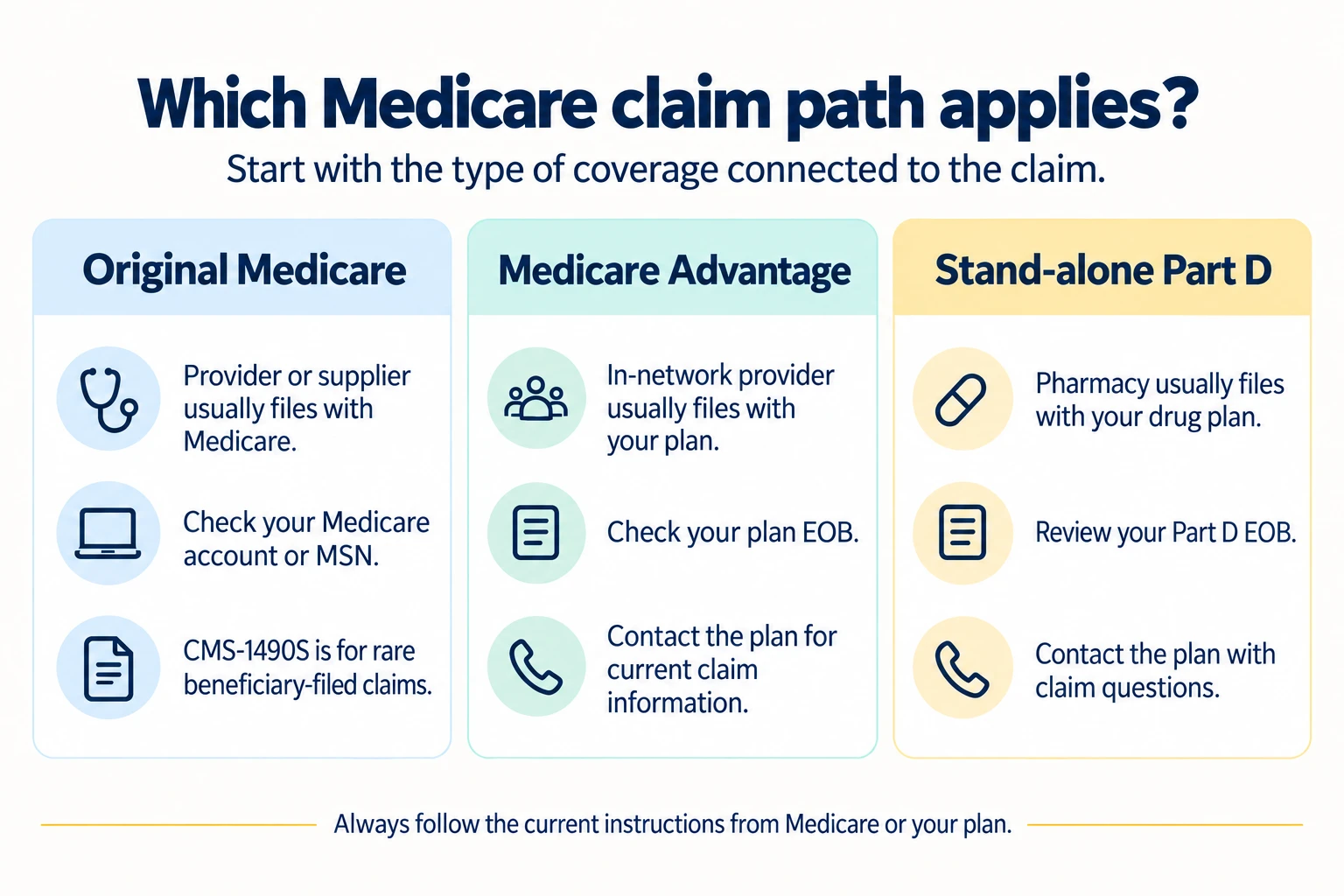
A provider bill, Medicare claim, Medicare Summary Notice (MSN), and Explanation of Benefits (EOB) are related, but they are not the same. A bill requests payment. A claim is submitted for processing. An MSN or plan statement explains what was submitted, how it was processed, and what you may owe.
How to File a Medicare Claim with Form CMS-1490S
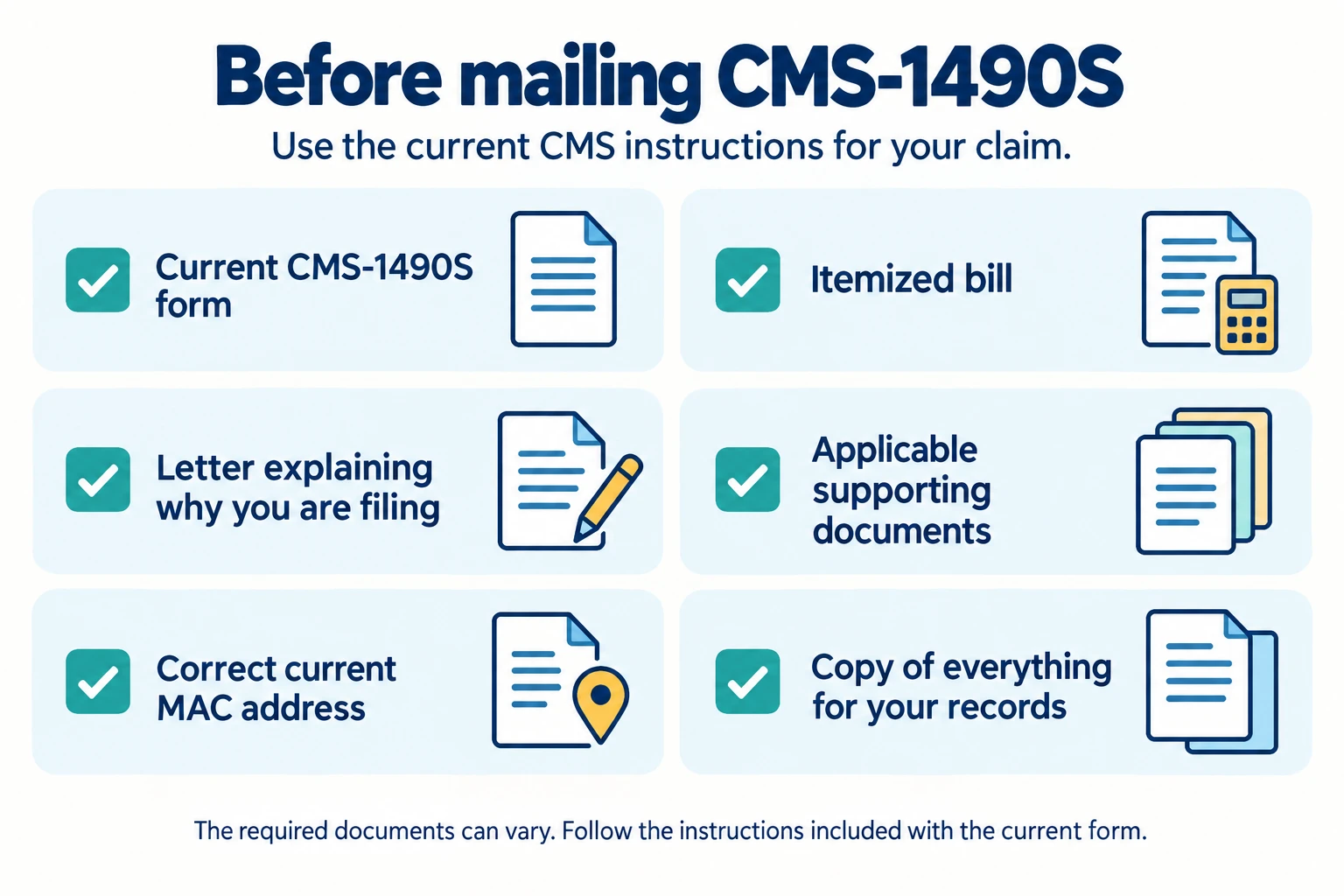
If you do need to file the claim yourself, use the current Patient's Request for Medical Payment, also called CMS-1490S. This form is for Original Medicare. CMS lets you complete it electronically, but the current process requires you to print and mail it with the required documents.
- Confirm that Original Medicare should receive the claim. If you have Medicare Advantage or Part D, use your plan's instructions instead.
- Download the current form. Get CMS-1490S from the official CMS page instead of relying on an old copy.
- Read the current instructions. Requirements can vary with the claim and your circumstances.
- Complete the beneficiary and service information carefully. Use the identifying information shown on your Medicare card.
- Get an itemized bill. It should show the service date, location, service or supply, charge, and provider or supplier. Include the National Provider Identifier if it is available.
- Write a brief explanation of why you are filing. For example, explain whether the provider was unable or unwilling to submit the claim.
- Add any required supporting documents. Follow the current instructions for other-insurance information, medical records, or other material relevant to your situation.
- Find the correct Medicare Administrative Contractor address. A Medicare Administrative Contractor, or MAC, processes claims for an assigned area and type of service. Use the current address table in the instructions.
- Mail the completed packet as directed. Include the form, itemized bill, explanation letter, and any required supporting documents.
- Save your records. Keep the form, attachments, mailing information, and later correspondence together.
The current CMS-1490S instructions control what must be included and where the packet must be sent.
Keep a complete copy of everything you mail for your records.
Where Do You Send a Medicare Claim?
There is no single nationwide mailing address for every Medicare claim. The correct destination depends on your coverage, the type of claim, and the contractor or plan that processes it.
For a beneficiary-filed Original Medicare claim, use the MAC address in the current CMS-1490S instructions. You may also find the correct processor by viewing another paid claim in your secure Medicare account. An MSN for another service may also identify it. Medicare's other forms page describes these routes.
For Original Medicare claim questions, call Medicare at 1-800-MEDICARE (1-800-633-4227). TTY users can call 1-877-486-2048.
For Medicare Advantage or Part D claims, use the member-services number or submission instructions supplied by your plan. This information is generally available on your membership card, plan website, or plan materials.
How Do You Check Medicare Claim Status?
Original Medicare users can check processed claims in their secure Medicare account or MSN/eMSN. Medicare Advantage and Part D members should use the claim information and member-services channels provided by their plan.
Original Medicare claim status
Sign in to your secure Medicare account to review Part A and Part B claims. According to Medicare's claim-status guidance, a claim is usually visible online within 24 hours after Medicare processes it.
That does not mean Medicare processes a new claim within 24 hours. For a mailed CMS-1490S request, allow at least 60 days for Medicare to receive and process it. This is not a promised completion date.
Medicare Advantage and Part D claim status
Check the EOB or claim information supplied by your Medicare Advantage plan. Use the plan's website or contact the plan when you need a current status or explanation. Plan documents, layouts, and timing can vary.
For Part D, review your drug plan's EOB or online claim information. Contact member services if you need the current status or an explanation.
Whenever you call Medicare or a plan, consider recording the date, representative's name, and any confirmation or reference number. Keep those notes with your bills and claim documents.
How Do You Read a Medicare Summary Notice or EOB?
Use the document tied to your coverage. Original Medicare uses an MSN. Part D uses an EOB for drug claims. A Medicare Advantage plan supplies its own claim and cost information. These documents are not interchangeable.
Original Medicare: Medicare Summary Notice
A Medicare Summary Notice, or MSN, is not a bill. It shows services or supplies billed to Medicare, what Medicare paid, and the maximum amount you may owe the provider.
Medicare.gov currently says a paper MSN is sent every six months when you received services or supplies during that period. If you choose electronic delivery, you receive an email link to an eMSN for a month in which you have a processed claim. You can also review processed Original Medicare claims in your secure account.
Compare each MSN with your receipts, provider bills, and services or supplies you actually received. CMS also offers sample Medicare Summary Notices to help you recognize the document's sections.
Part D: Explanation of Benefits
Medicare's dedicated Explanation of Benefits page describes the Part D EOB. A drug plan sends it for a month in which you fill a prescription. It summarizes prescription claims and costs.
Review it for mistakes and contact the drug plan if you have questions about an entry.
Medicare Advantage: Plan claim and cost information
Review the EOB or claim information sent by your Medicare Advantage plan. Medicare's claim-status guidance directs plan members to contact their plan when they need newer information.
Use your plan's definitions and instructions. Do not assume its layout, timing, or details will match a Part D EOB or an Original Medicare MSN.
How Do You Correct Medicare Claim or Billing Information?
Compare the notice or plan record with your bill and the care you received. Contact the provider, supplier, or plan responsible for the claim before assuming you need an appeal.
- Compare the records. Review the MSN, EOB, or plan information alongside the bill, receipts, and your own record of care.
- Contact the provider, supplier, or plan. Ask whether the correct service, date, provider information, and charges were submitted.
- Ask about a correction. The provider, supplier, or plan may be able to correct or resubmit an incomplete or inaccurate claim.
- Allow time and check again. Review your secure Medicare account or plan records after the correction has had time to process.
- Keep notes. Record contact dates, names, reference numbers, and what you were told.
- Use the official fraud route when appropriate. Follow Medicare's instructions for reporting suspected Medicare fraud if you did not receive a listed service or the facts suggest more than an ordinary error.
A provider bill is not proof that Medicare denied a properly submitted claim. A missing or inaccurate claim may be corrected. An unfamiliar charge is not automatically fraud. A correction also does not guarantee coverage or payment.
When Does a Medicare Claim Problem Become an Appeal?
You may need a Medicare claim appeal when the claim information is correct but you disagree with the coverage or payment decision.
Read the official notice explaining the decision because it contains information for that claim. Medicare also provides general appeal information. Detailed appeal and grievance instructions belong on the separate appeals page.
Medicare Claims Checklist
If the process still feels like a lot, use this checklist one step at a time:
- Identify whether the claim involves Original Medicare, Medicare Advantage, or Part D.
- Contact the provider or plan first when appropriate.
- Use the current CMS-1490S only when beneficiary filing is appropriate.
- Include the completed form, itemized bill, explanation letter, and any required supporting documents.
- Verify the current destination before mailing anything.
- Keep a complete copy and notes about important contacts.
- Check status through Medicare or your plan.
- Compare the MSN, EOB, or plan information with your services and bills.
- Decide whether the issue is a missing claim, correction, suspected fraud, or appeal.
Verify Current Medicare Claim Requirements
Medicare rules, forms, deadlines, and contact information can change. Before submitting a claim or taking action, confirm the current requirements at Medicare.gov or call 1-800-MEDICARE.
Frequently Asked Questions
Can someone else sign Form CMS-1490S for me?
Official Medicare Claims Help
If a claim is missing, contact the provider, supplier, or plan that should have submitted it. Use CMS-1490S only when the current Original Medicare rules apply to your situation.
For official help, call Medicare or find your local State Health Insurance Assistance Program. SHIP offers free, personalized health-insurance counseling to people with Medicare.